
Inventory Management in TallyPrime
What is Inventory Management?
Inventory Management is the process of recording, tracking, controlling, and reporting the movement of goods in a business. It helps a business know what items are available, how much stock is available, where the stock is stored, how much was purchased, how much was sold, and the value of closing stock.
In TallyPrime, inventory management allows businesses to maintain stock records along with accounting transactions. You can create stock items, classify them into groups, maintain units of measurement, manage multiple godowns, record purchases and sales, transfer stock between locations, and generate detailed inventory reports.
For students learning Tally, understanding inventory management is important because it connects Stock Masters + Inventory Vouchers + Accounting + GST + Inventory Reports.
Why is Inventory Management Important?
Inventory management helps a business to:
- Maintain accurate stock quantities
- Track purchases and sales
- Know available stock
- Track stock location
- Maintain multiple godowns
- Calculate stock value
- Identify fast-moving and slow-moving items
- Record stock transfers
- Track opening and closing stock
- Generate inventory reports
Inventory Masters in TallyPrime
Before entering inventory transactions, you generally need to create the required Inventory Masters.
The important inventory masters are:
| Inventory Master | Purpose |
|---|---|
| Stock Group | Groups similar stock items |
| Stock Category | Provides an additional classification of stock |
| Stock Item | Individual product or material |
| Unit of Measure | Defines how stock is measured |
| Godown | Maintains stock according to location |
| Batch | Tracks stock batches where applicable |
Units of Measure
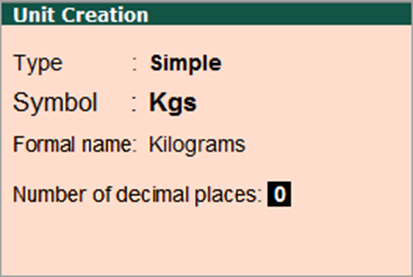
Stock Items are mainly purchased and sold on the basis of quantity. The quantity in turn is measured by units. In such cases, it is necessary to create the Unit of Measure. The Units of Measure can either be simple or compound. Examples of simple units are: nos., meters, kilograms, pieces etc.
How to create unit of measure?
- Gateway of Tally ——> Create ——> Units of Measure
Create Compound Unit of Measure
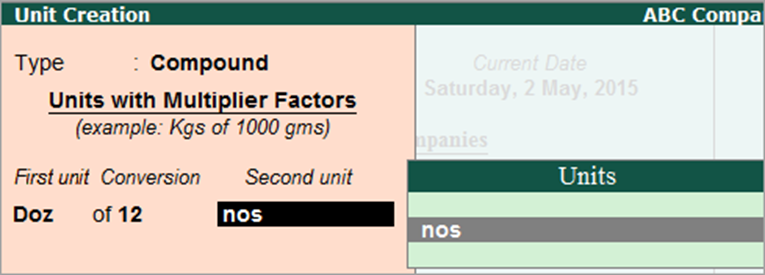
A Compound Unit is a relation between two Simple Units.
For example, To Create Compound unit – Doz (Dozen) of 12 Nos (Numbers), you have to create two simple units, Doz (Dozen) and Nos (Numbers) and set the conversion factor as 12.
What is stock group?
In Inventory, the stock groups are similar to groups in accounting master. In Tally, the stock group is used to help in the classification of stock items according to their behavior. Under stock groups, the stocks can be grouped according to their product type, characteristics, and brand.
How to create stock group?
- Gateway of Tally ——> Create ——> Stock group
What is stock Category?
Stock Category offers a parallel classification of stock items. The advantage of Categorizing items is that you can classify the stock items (based on functionality) together – across different stock groups which enables you to obtain reports on alternatives or substitutes for a stock item.
How to create stock Category?
- Gateway of Tally ——> Create ——> Stock Category
Godown/Location Management
A Godown is a location where stock is stored. Businesses with multiple warehouses, branches, shops, or storage locations can maintain separate stock records for each location. Tally Prime summarizes the details of stock items available in each Godown in the Godown/Location Summary report.
How to create stock godown?
- Gateway of Tally ——> Create ——> Godown (location)
What is stock item?
Stock items are goods that you manufacture or trade (sell and purchase). It is the primary inventory entity. Stock Items in the Inventory transactions are similar to ledgers being used in accounting transactions.
How to Create stock item?
- Gateway of Tally ——> Create ——> Stock Item
Display Stock Summary and Report
- Gateway of Tally ——> Stock Summary
- Gateway of Tally ——-> Display ——->Inventory Book ——-> Stock Item
- Gateway of Tally ——-> Display ——–> Inventory Book ——-> Group Summary
- Gateway of Tally ——-> Display ——–> Inventory Book ——-> Categories
- Gateway of Tally ——> Display ——> Statement of Inventory ——> Godown
Do the following entry of respective GST included stock items.
The following table contains details of various Food & Grocery stock items taxable at 5% GST. Students are required to enter the Stock Items, Units, HSN Codes, GST Rates, Purchase & Sales Rates in Tally. Enter the opening stock quantities and values for Mumbai, Pune, Jaipur, and Surat locations. This exercise will help students practice inventory and GST-related entries in Tally.
| Stock Item | Unit | HSN | GST % | Purchase Rate | Sales Rate | Mumbai | Pune | Jaipur | Surat | Total | Opening Value |
| Packaged Tea 250g | Pcs | 902 | 5% | ₹ 85 | ₹ 105 | 49 | 55 | 76 | 48 | 228 | ₹ 19,380 |
| Packaged Coffee 200g | Pcs | 901 | 5% | ₹ 110 | ₹ 135 | 75 | 49 | 90 | 65 | 80 | ₹ 8,800 |
| Wheat Flour 5kg | Bag | 1101 | 5% | ₹ 210 | ₹ 245 | 81 | 78 | 80 | 64 | 100 | ₹ 21,000 |
| Rice 5kg | Bag | 1006 | 5% | ₹ 280 | ₹ 325 | 56 | 54 | 65 | 85 | 90 | ₹ 25,200 |
| Sugar 5kg | Bag | 1701 | 5% | ₹ 210 | ₹ 240 | 53 | 89 | 86 | 75 | 75 | ₹ 15,750 |
| Packed Cooking Oil 1L | Bottle | 1512 | 5% | ₹ 115 | ₹ 135 | 84 | 82 | 94 | 65 | 150 | ₹ 17,250 |
| Biscuits Pack | Pcs | 1905 | 5% | ₹ 180 | ₹ 30 | 84 | 94 | 95 | 83 | 300 | ₹ 54,000 |
| Packaged Namkeen | Pcs | 2106 | 5% | ₹ 45 | ₹ 55 | 62 | 47 | 91 | 45 | 180 | ₹ 8,100 |
The following table contains details of various Electrical & Home Appliances taxable at 12% GST. Students are required to enter the Stock Items, Units, HSN Codes, GST Rates, Purchase & Sales Rates in Tally. Enter the opening stock quantities and values for Mumbai, Pune, Jaipur, and Surat locations. This exercise will help students practice inventory management and GST-related entries in Tally.
| Stock Item | Unit | HSN | GST % | Purchase Rate | Sales Rate | Mumbai | Pune | Jaipur | Surat | Total | Opening Value |
| LED Bulb 9W | Pcs | 8539 | 12% | ₹ 65 | ₹ 85 | 77 | 79 | 73 | 65 | 294 | ₹ 19,110 |
| LED Tube Light | Pcs | 8539 | 12% | ₹ 180 | ₹ 230 | 87 | 82 | 59 | 68 | 80 | ₹ 14,400 |
| Electrical Switch | Pcs | 8536 | 12% | ₹ 35 | ₹ 50 | 66 | 86 | 67 | 78 | 100 | ₹ 3,500 |
| Electrical Socket | Pcs | 8536 | 12% | ₹ 150 | ₹ 65 | 82 | 48 | 86 | 47 | 90 | ₹ 13,500 |
| Modular Switch Board | Pcs | 8536 | 12% | ₹ 120 | ₹ 165 | 52 | 45 | 74 | 68 | 75 | ₹ 9,000 |
| Extension Board | Pcs | 8536 | 12% | ₹ 250 | ₹ 325 | 49 | 62 | 47 | 88 | 150 | ₹ 37,500 |
| Ceiling Rose | Pcs | 8536 | 12% | ₹ 40 | ₹ 55 | 49 | 66 | 93 | 51 | 300 | ₹ 12,000 |
| Electrical Wire 90m | Roll | 8544 | 12% | ₹ 1,850 | ₹ 2,250 | 71 | 91 | 75 | 86 | 180 | ₹ 3,33,000 |
The following table contains details of various Computer & IT Accessories taxable at 18% GST. Students are required to enter the Stock Items, Units, HSN Codes, GST Rates, Purchase & Sales Rates in Tally. Enter the opening stock quantities and values for Mumbai, Pune, Jaipur, and Surat locations. This exercise will help students practice inventory management, stock valuation, and GST-related entries in Tally.
| Stock Item | Unit | HSN | GST % | Purchase Rate | Sales Rate | Mumbai | Pune | Jaipur | Surat | Total | Opening Value |
| USB Keyboard | Pcs | 8471 | 18% | ₹ 550 | ₹ 750 | 79 | 53 | 60 | 66 | 258 | ₹ 1,41,900 |
| Wireless Mouse | Pcs | 8471 | 18% | ₹ 450 | ₹ 650 | 89 | 52 | 62 | 79 | 80 | ₹ 36,000 |
| Wired Mouse | Pcs | 8471 | 18% | ₹ 250 | ₹ 350 | 84 | 59 | 54 | 47 | 100 | ₹ 25,000 |
| Computer Monitor 22-inch | Pcs | 8528 | 18% | ₹ 6,500 | ₹ 8,200 | 88 | 54 | 50 | 51 | 90 | ₹ 5,85,000 |
| Computer Monitor 24-inch | Pcs | 8528 | 18% | ₹ 8,000 | ₹ 10,000 | 75 | 64 | 57 | 64 | 75 | ₹ 6,00,000 |
| Computer Keyboard & Mouse Combo | Set | 8471 | 18% | ₹ 750 | ₹ 1,050 | 46 | 92 | 69 | 72 | 150 | ₹ 1,12,500 |
| USB Flash Drive 64GB | Pcs | 8523 | 18% | ₹ 450 | ₹ 650 | 70 | 61 | 45 | 82 | 300 | ₹ 1,35,000 |
| External Hard Drive 1TB | Pcs | 8471 | 18% | ₹ 4,500 | ₹ 5,750 | 72 | 95 | 93 | 81 | 180 | ₹ 8,10,000 |
| Computer Webcam | Pcs | 8525 | 18% | ₹ 1,200 | ₹ 1,650 | 71 | 72 | 56 | 76 | 181 | ₹ 2,17,200 |
| Laser Printer | Pcs | 8443 | 18% | ₹ 9,500 | ₹ 12,000 | 81 | 83 | 45 | 86 | 182 | ₹ 17,29,000 |
The following table contains details of various Consumer Electronics & Appliances taxable at 28% GST. Students are required to enter the Stock Items, Units, HSN Codes, GST Rates, Purchase & Sales Rates in Tally. Enter the opening stock quantities and values for Mumbai, Pune, Jaipur, and Surat locations. This exercise will help students practice inventory management, stock valuation, and GST-related entries in Tally.
| Stock Item | Unit | HSN | GST % | Purchase Rate | Sales Rate | Mumbai | Pune | Jaipur | Surat | Total | Opening Value |
| Air Conditioner 1.5 Ton | Pcs | 8415 | 28% | ₹ 32,000 | ₹ 39,000 | 48 | 85 | 46 | 87 | 266 | ₹ 85,12,000 |
| Refrigerator 250L | Pcs | 8418 | 28% | ₹ 24,000 | ₹ 29,000 | 84 | 48 | 45 | 94 | 80 | ₹ 19,20,000 |
| Washing Machine | Pcs | 8450 | 28% | ₹ 20,000 | ₹ 25,000 | 76 | 58 | 65 | 48 | 100 | ₹ 20,00,000 |
| Microwave Oven | Pcs | 8516 | 28% | ₹ 7,500 | ₹ 9,500 | 73 | 89 | 57 | 66 | 90 | ₹ 6,75,000 |
| Dishwasher | Pcs | 8422 | 28% | ₹ 28,000 | ₹ 34,000 | 75 | 93 | 92 | 57 | 75 | ₹ 21,00,000 |
| Large Screen Television | Pcs | 8528 | 28% | ₹ 35,000 | ₹ 43,000 | 57 | 62 | 80 | 70 | 150 | ₹ 52,50,000 |
| Premium Air Cooler | Pcs | 8479 | 28% | ₹ 8,500 | ₹ 10,500 | 62 | 95 | 76 | 77 | 300 | ₹ 25,50,000 |
| Home Theatre System | Set | 8518 | 28% | ₹ 12,000 | ₹ 15,000 | 84 | 67 | 77 | 47 | 180 | ₹ 21,60,000 |